The calculator that shows its solution.
CalcOwlator is a list calculator for iPhone. Every number has a name, and every total can show you how it was reached. Use it for budgets, bills, groceries, trips and savings goals.
 Coming soon to the App Store
For iPhone, iOS 18 or later
Coming soon to the App Store
For iPhone, iOS 18 or later
Try the list. Tap a total to see the rows that feed it, or tap an amount to change it. The sums work the way they do in the app.
- Income
- Salary42,000.00
- Side work8,500.00
- Total income50,500.00
- Bills
- Rent14,000.00
- Electricity2,850.00
- Internet1,699.00
- Phone load3 × 299.00897.00
- Total bills19,446.00
- Groceries
- Rice, 25 kg1,450.00
- Cooking oil2 × 165.00330.00
- Eggs, 1 tray285.00
- Groceries total2,065.00
- Summary
- Left overTotal income − Total bills − Groceries total28,989.00
How we got Left overTotal income 50,500.00 −Total bills 19,446.00 −Groceries total 2,065.00 =28,989.00
You’ve changed the example.
A month with CalcOwlator
From the first row to the next month’s list. Screens are from the current build, with example amounts in pesos.
-
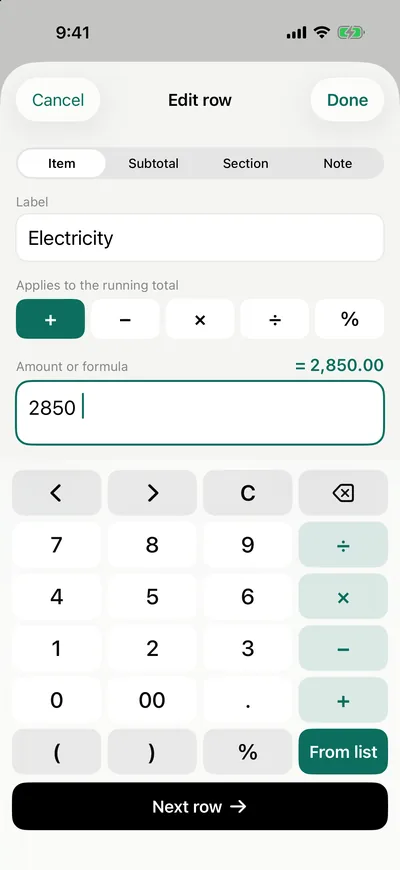
Write it down
Give each row a name and an amount, with the keypad built in. From list pulls in another row, a section or a total, so Left over can be income minus bills minus groceries.
Or type it like a note: “2x eggs 285” becomes a row as you type.
-
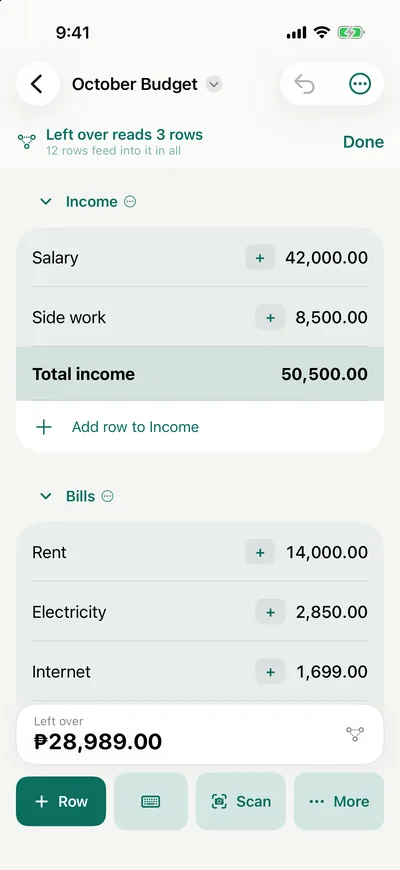
Check how it was reached
Tap a total and How we got this lists every row that went into it, with its sign. Long-press a worked-out row and Show what feeds this lights them up in the list.
Links point at the row itself, so renaming or moving a row never breaks a total.
-
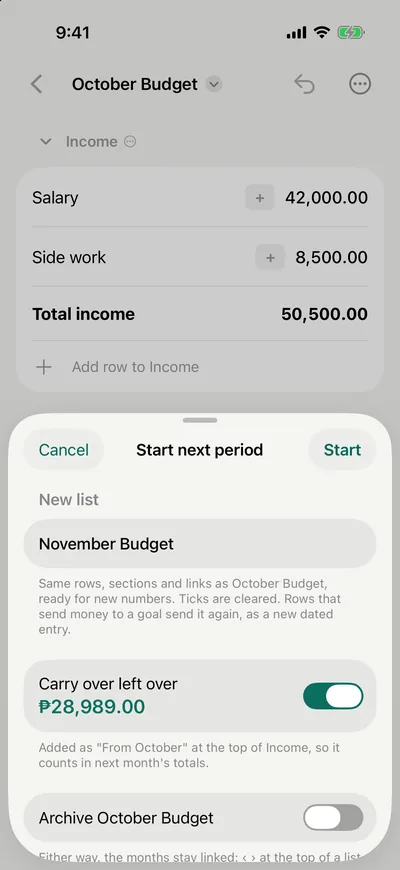
Start November from October
From the list’s menu, start the next month. You get the same rows, sections and links, with ticks cleared. What’s left can come along as the first row, so it counts in November’s totals.
Rows marked only this month stay behind, and the months stay linked.
-
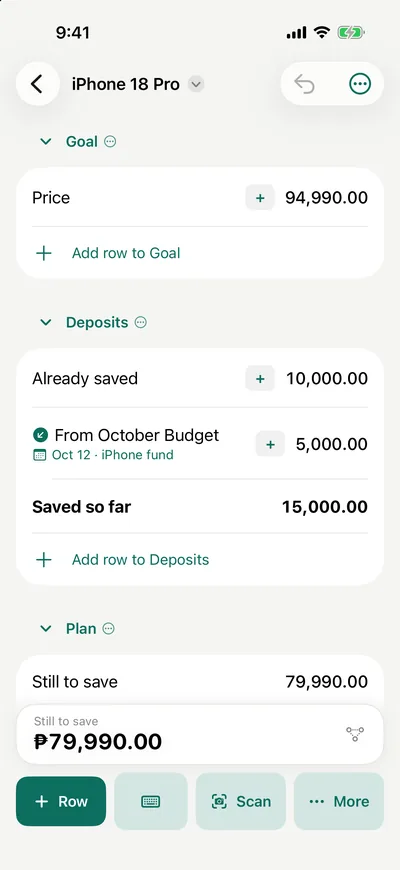
Put some aside
A budget row can send money to a savings goal. It lands there as a dated deposit and goes again each new month, so the goal always shows what’s saved and what’s still to save.

Exact to the last cent
Many calculators store numbers in binary, which can’t hold most decimals exactly, so half a cent can round the wrong way.
CalcOwlator adds in exact decimals and rounds only when it shows a number, half away from zero. Each list can show no decimals, 2, 3, or choose for itself.
The exact answer is 1,977.075. Rounded to two places:
| Worked out with | Shows |
|---|---|
| Binary floating point | 1,977.07 |
| CalcOwlator | 1,977.08 |
Also in the app
- Type it like a note
- “2x eggs 285” becomes a row as you type. End a line with a colon to start a section. Paste a whole list from Notes or a chat at once.
- Scan receipts and bills
- The store, the date and every item come in, checked against the printed total. A scanned bill sets its amount and due date. The text is read on your iPhone, and nothing is uploaded.
- Barcodes and payment QR codes
- Name an item once and its barcode adds it next time. A payment QR code fills in who you paid.
- Bills and reminders
- Give a row a due day and you’re reminded before it and on the day, until you tick it paid.
- Spending limits
- A bar under a section shows how much of its limit is used. It turns amber near the limit and red when you’re over.
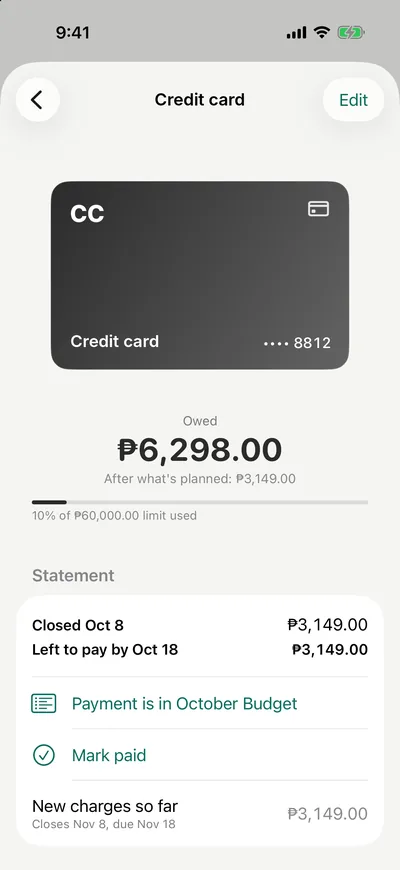
- Accounts and cards
- Cash, banks, e-wallets, credit cards and pay later. Say which account a row comes out of, and balances follow what you tick. Card statements show what’s left to pay by the due date. CalcOwlator never connects to your bank.
- 14 templates
- Monthly and twice-a-month budgets, bills, groceries, a weekly allowance, a small shop’s sales, an event, recipe costing, a trip split, savings, vacation and emergency funds, an installment plan and paying off a card. In pesos they use familiar words like kinsenas, baon and sari-sari.
- Groups, pins and search
- Pin a list to the top, sort lists into groups, archive the ones you’re done with, and search across lists and rows.
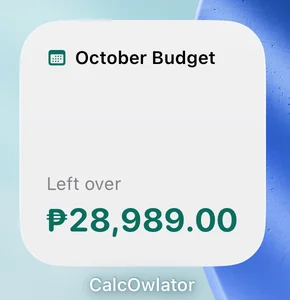
- Widgets
- Left this month, Due soon and Goal, for the Home Screen and Lock Screen.
- Share or export
- Text for a chat, an A4 PDF, a picture, or a spreadsheet (CSV).
- Face ID lock
- Lock the app, and amounts are hidden in the app switcher and in widgets while the lock is on.
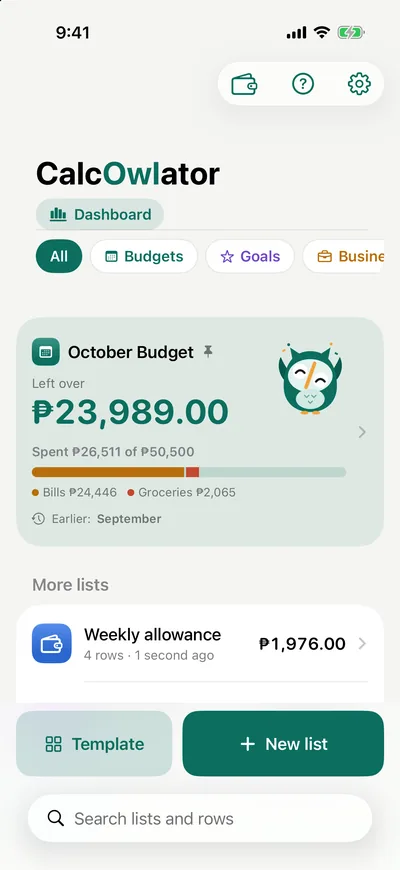
- Dashboard and iCloud sync Pro
- Your month, what’s due, spending over time and every goal on one screen. iCloud sync keeps your lists the same on your devices.
Free, with Pro when you need more
Free covers nearly everything above. Pro removes the limits and adds sync and history. Nothing you’ve made is ever locked: only adding more asks you to upgrade.
| Free | Pro | |
|---|---|---|
| Lists (a stack of months counts as one) | 5 | Unlimited |
| Links between lists | 5 | Unlimited |
| Amounts used from other rows in a list | 5 of your own, plus any a template came with | Unlimited |
| Scanned receipts | One row, with the items in its note | Each item as its own row, sorted into your sections |
| iCloud sync across your devices | No | Yes |
| Dashboard and month-by-month history | No | Yes |
| Accounts in other currencies | No | Yes |
| Account balances in formulas | No | Yes |
Buying Pro
Pro is a yearly or monthly subscription, or a one-time lifetime purchase. The yearly plan starts with a free week if you haven’t had one before. The App Store shows the price in your own currency before you buy.
Subscriptions renew automatically unless cancelled at least 24 hours before the end of the period, in Settings › your name › Subscriptions. See the terms of use.

Your lists stay yours
CalcOwlator collects no data. There’s no account to make, no analytics and no ads. Your lists stay on your iPhone, and in your own private iCloud if you turn on sync. Read the privacy policy.

Coming soon to the App Store
For iPhone with iOS 18 or later. Questions before then? Email calcowlator@